


Famio: Connect With Family
3.61.40K Reviews
App Specs
- Version
- 1.43.2
- Updated On
- License
- Free
- Downloads
- 10,000,000+
- Developer
- Gismart
- Categories
- Lifestyle
- Platform
- Android, iOS
Screenshots


 Analysis by AppCompare
Before I put a family app on everyone’s phone, I ask one practical question: will it make a routine conversation easier, or give us another place to check? That distinction matters more than a long feature list. Famio: Connect With Family is aimed at keeping relatives in touch, and it makes the most sense when your family wants a shared space for coordinating and checking in rather than relying on scattered messages.
It is a free lifestyle app from Gismart, rated for Everyone, with a 3.6 average from around 110,000 ratings and more than 10 million installs. Those figures suggest plenty of people have tried it, but they do not tell me whether it suits a particular household. The useful question is whether your family will agree on a simple habit for using it—and whether the features you need are available on your devices and within your budget.
Choose it for a shared routine, not just another chat
Families already have plenty of ways to communicate. A regular messaging app is often enough for quick questions, while a shared calendar can handle appointments without asking everyone to join a new social space. Famio’s appeal is that it brings family-oriented tools together. That can reduce the little bits of coordination spread across separate conversations, but only if the people involved actually open the app.
I would consider it for a household juggling school pickups, visits with older relatives, and changing work hours. It can also make sense for family members who live apart but want a common place to share updates. By contrast, if your relatives are already happy with one group chat and a calendar they all use, moving everyone may solve a problem you do not really have.
Where the family-focused approach can help
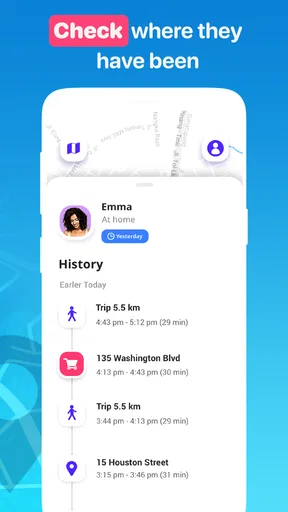
Location sharing is most useful when it answers a specific, agreed-upon question, such as whether a family member has arrived or is on the way. I would discuss who can see location information and when before making it part of the routine. A location tool should support reassurance, not become a substitute for trust or a reason to monitor someone constantly. This is especially important with teenagers, who may reasonably want clear boundaries.
A shared calendar can help with the recurring friction of family life: remembering who is collecting a child, when a visit is planned, or which day an appointment falls on. My practical tip is to agree on what belongs there before inviting everyone. If every small possibility becomes an entry, the calendar becomes noisy; if only commitments that affect other people go in, it is easier to scan and more likely to stay useful.
Group messaging and shared photos address a different need. They can give relatives a dedicated place for everyday updates without mixing them into work chats or public social feeds. That is a good fit for a family that wants to share snapshots with grandparents, for example, but not necessarily for people who prefer to keep all media in their existing photo-sharing routine. A private-feeling family space is still a shared digital space, so I would make sure everyone is comfortable with who is included before posting personal moments.
Worth Reading Before You Choose

Flipboard Shows What News Apps Must Do Beyond the Feed

Switching to Android Auto Means Rethinking Your Driving Routine

Google Calendar Makes a Crowded Week Easier to Manage

Ludo King Makes the Most of the Minutes Between Plans

Baby Panda World Brings Quick Play to Modern Phones, but Its Game Library Feels Busy

ESPN’s Live Game View Makes Following Close Games Easier
When a different option is the better fit
For a family that mainly needs fast text conversations, a familiar messenger is likely the lower-friction choice: most people already know how it works, and there is no new routine to establish. If the central problem is scheduling, a standalone calendar may be clearer and easier to maintain. If the need is only occasional reassurance about someone’s whereabouts, it may be better to agree on check-in messages instead of keeping location sharing active.
Famio is less compelling when some relatives do not want another app, have limited comfort with smartphones, or are reluctant to share location or personal media. Those are not minor objections to work around; they affect whether the family can use the app comfortably. I would not install it for someone else or treat participation as automatic. Ask first, explain the intended use, and let each person decide which parts they are happy to use.
There is also a practical device question. The current version is 1.43.2 and requires iOS 11 or later, so I would check that each intended user’s device meets the requirement before planning a household switch. If even one key person cannot install it, the family will still need a fallback channel, and that can leave updates split between apps.
Make the switch small and deliberate
Changing family communication tools has a hidden cost: everyone has to remember where to post, which calendar is current, and whether an alert needs a reply. I would avoid moving every conversation at once. Start with one shared purpose, such as coordinating a weekly pickup or keeping a small group informed about visits. If that works naturally, you can decide whether to bring in more of the family’s routine.
Before relying on any safety-related feature, agree on a fallback. An app should not be the only plan for an urgent situation, especially if someone’s phone is unavailable or they do not see a notification. A simple family understanding—who to call, what to do, and when to use an alert—can make a digital tool more useful without assuming it replaces direct contact.
It is also worth deciding how to handle notifications. If every schedule change or message generates interruptions, people may mute the app and miss the updates that matter. I would keep the shared space focused: use it for information that affects the group, and leave one-to-one or non-urgent conversation where it already works best. That small boundary can make a family app feel helpful rather than demanding.
Getting Started with Famio
Setting up Famio is as easy as pie. Download the app from your favorite app store, and you’re ready to roll. Once you’ve got it installed, sign up using your email or social media account. The interface is clean and intuitive, so you won’t feel like you’re deciphering hieroglyphics just to get started. Trust me, even my tech-challenged aunt could navigate this with ease.
Features That Make Life Easier
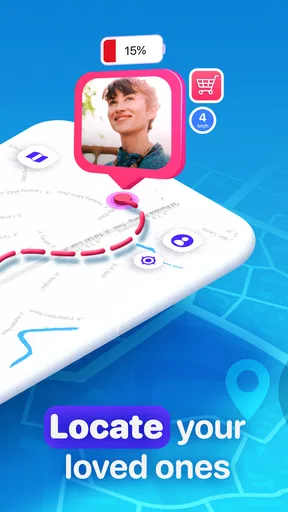
Now, let’s dive into the nitty-gritty. Famio comes packed with features that are all about making family life less chaotic. The location tracking feature is a game-changer—especially if you’ve got teens who love to wander. No more frantic calls asking, “Where are you?” Just check the app and breathe a sigh of relief.
Another cool feature is the shared calendar. You can synchronize everyone’s schedules, so you know when your partner’s work meeting ends or when your kid’s soccer game kicks off. It’s like having a personal assistant that keeps everyone on the same page.
Keeping Everyone in the Loop
Communication is key, and Famio nails it with its messaging feature. You can create group chats for different branches of the family tree, like one for immediate family and another for those extended cousins you see once a year. The best part? The messages are instant, so no more waiting around for replies like it’s the 90s.
And if you’re all about sharing moments, the app lets you upload photos and videos. It’s a mini social media platform just for your family. Grandma can finally see those vacation snaps without navigating through social media labyrinths.
Safety First
In today’s world, safety is a biggie, and Famio takes it seriously. The emergency alert feature is something every family should have. In case of an emergency, you can send an alert with your location to all family members with just a tap. It’s reassuring to know that help is just a button away.
User Experience
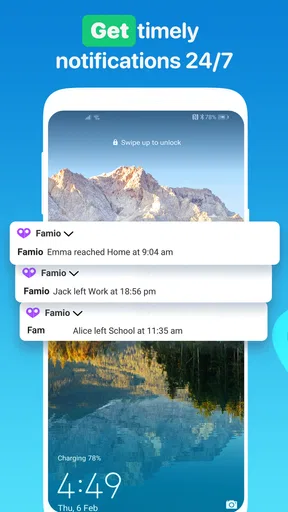
The user experience is one of the highlights of Famio. The app runs smoothly without any annoying bugs or crashes. Notifications are timely, ensuring you don’t miss out on important updates. Plus, the app doesn’t drain your phone’s battery, which is a huge win in my book.
Customer support is also worth mentioning. If you ever hit a snag, the support team is responsive and helpful. They’re like the friendly neighbor who’s always ready to lend a hand.
Wrapping It Up
So, is Famio worth it? Absolutely. It’s a versatile app that keeps families connected in a world that’s constantly on the move. Whether you’re checking on your kids, coordinating schedules, or sharing moments, Famio makes it all feel effortless. It’s like having a Swiss Army knife for family management right on your phone.
If you’re looking to bring your family closer together, Famio: Connect With Family might just be the app you didn’t know you needed. Go ahead, give it a try, and watch your family ties grow stronger than ever.
One point I would check before committing is the cost beyond the free download. Famio includes in-app purchases ranging from $4.99 to $79.99 per item, so I would review the available purchase choices in the app and decide whether any paid option is actually needed for your family. I would not assume every useful function requires payment, or that the free experience will cover every household’s needs; check the choices directly before asking relatives to build a routine around it.
For an ordinary weekday, imagine a parent finishing work while another family member handles pickup. A shared calendar can make the plan visible, a quick message can flag a delay, and an agreed location check can provide reassurance if someone is late. The value is not that the app replaces a conversation; it is that the family can choose one place to look for the details that would otherwise be buried in separate texts. If no one updates the plan, though, the calendar can become misleading, so the person changing arrangements should also tell the people affected.
That workflow points to a useful distinction: a family app is only as dependable as the habits around it. I would nominate one person to keep shared events tidy, avoid duplicating every personal appointment, and use direct calls for urgent matters. These are small choices, but they prevent the common failure mode of a shared tool turning into an outdated noticeboard. If a relative rarely checks apps, a direct reminder may still be kinder and more reliable.
Another trade-off is the balance between convenience and personal space. Location sharing may ease worry when a family member is travelling, but it should not be treated as proof that someone is safe or available. A phone can be off, a person may not see an alert, and ordinary location information cannot explain what is happening. I would agree on when location checks are welcome and pair them with a straightforward way to contact one another.
Famio is free to install and is rated for Everyone, which makes trying it straightforward, but the age rating does not remove the need for an adult to think carefully about how younger family members use sharing tools. Talk through the family’s expectations, especially around location and photos, rather than assuming that a child or teen understands the implications. That conversation is part of setting up the app responsibly, not a reason to avoid useful coordination altogether.
The app has an average rating of 3.6 from around 110,000 ratings, alongside about 1,300 written reviews. I read that as a reason to approach it with realistic expectations rather than as a verdict on whether it will work for your household. A rating cannot tell you whether your relatives will adopt a shared calendar or whether your family prefers another messenger; a short trial around one real task is more informative.
Famio has been available since April 4, 2020, and its current version is 1.43.2. For me, the sensible way to evaluate it is to install it on a compatible device, set up only the family members who have agreed to participate, and test one routine before shifting anything important. If the app makes that routine clearer without creating extra checking, keep using it. If people continue to default to their existing chat or feel uncomfortable with sharing, choosing a simpler alternative is a perfectly good outcome.
In the end, I would recommend this app to families who genuinely want shared coordination, are comfortable discussing privacy, and will use its family-focused tools consistently. I would skip it if all you need is basic messaging, if a separate calendar already works well, or if the group is not willing to adopt another app. Its strongest case is practical: bring a few recurring family updates into one place, use them thoughtfully, and keep a direct-contact backup for anything urgent. That is a more grounded reason to try Famio than expecting an app by itself to make relatives closer.
Pros
- Easy setup for quick family connection.
- Real-time location sharing for peace of mind.
- Customizable alerts for important updates.
- User-friendly interface for all ages.
- Cross-platform support for Android and iOS.
Cons
- Drains battery with constant GPS use.
- Subscription required for premium features.
- Limited features in the free version.
- Occasional location inaccuracies reported.
- Requires internet for full functionality.
FAQs for Famio: Connect With Family
What is Famio: Connect With Family?
Famio: Connect With Family is a mobile application designed to help families stay connected and organized. It offers features like location sharing, group chats, and reminders to ensure everyone is on the same page. Compatible with both Android and iOS devices, it aims to simplify family communication and coordination.
How does Famio ensure user privacy and data security?
Famio prioritizes user privacy by implementing robust encryption for all data and communications. Users can control who sees their location and personal information, ensuring that only trusted family members have access. The app complies with industry standards for data security to protect against unauthorized access.
Is Famio suitable for large families?
Yes, Famio is designed to accommodate families of all sizes. It allows for multiple user profiles and offers customizable settings for each member. Whether your family is large or small, Famio provides tools to manage and communicate effectively within the family unit, making it versatile for various family structures.
Does Famio require a subscription?
Famio offers both free and premium subscription plans. The free version includes basic features such as location sharing and group messaging. The premium version, available for a monthly fee, unlocks additional features like advanced notifications, priority customer support, and more comprehensive family management tools.
Can I use Famio without an internet connection?
Famio requires an internet connection to access most of its features, such as real-time location sharing and messaging. However, some offline functionalities, like viewing previously saved data or setting reminders, may still be available. For optimal performance, it's recommended to use the app with a stable internet connection.


